View Quarter
Run The Elements
Register on MyRaceTime
Run The Elements Virtual Challenge 2026

The Virtual Fitness Challenge that takes you through 4 Elements.
Run. Walk. Cycle. Log every kilometre. Earn your place in legend.

--
Participants
--
Total Distance
--
Hours on Move
--
Activities Logged
--
Clubs & Orgs
--
Legend Eligible
2+ Quarters
--
Cities
2026 Season

The Four Elements

Each quarter brings a new element challenge. Complete all four to become an Elemental Legend.

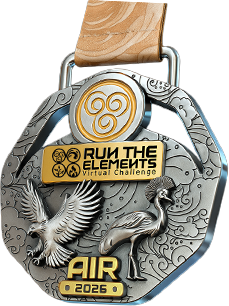
Air

Air

Jan – Mar 2026
Running, Walking & Cycling

Q1 Complete
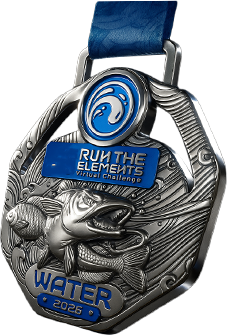
Water

Water

Apr – Jun 2026
Running, Walking & Cycling

⭐ Active Now
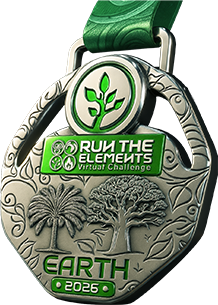
Earth

Earth

Jul – Sep 2026
Running, Walking & Cycling

Coming Soon
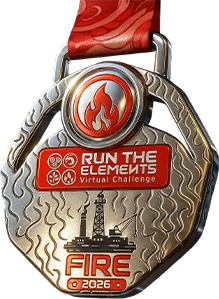
Fire

Fire

Oct – Dec 2026
Running, Walking & Cycling

Coming Soon

💧 Water Quarter Is Live!

April to June 2026 · 503 participants already registered and moving. Join the challenge on MyRaceTime today.

Register on MyRaceTime
Quarter flyers will appear here
Participant Lookup

Find Your Status

Search by name or bib number to see your distances, activities, legend status, and more.

No participant found. Try searching by full name or bib number.
--
Statistics

Quarter Analytics

Gender Split
Category Distribution
Age Groups
Avg Distance by Category (km)
Countries
Top Cities
Completion Tiers (% of target)
Pace Distribution (Run/Walk)
Quarter Comparison · Air vs Water
Top 15 Clubs by Total Distance
Top 15 Clubs by Member Count
Air Q1 2026

Leaderboard

Filter:

🏆 Top Distance · Individual

⚡ Most Activities Logged

🏃 Fastest Pace · Run/Walk

🏆 Top Clubs by Members

🏙️ Top Cities by Distance

📈 Most Improved · Air→Water

Air Q1 2026

Club Standings

#Club / OrganisationMembersTotal DistAvg DistCompletionActivitiesGrade
Registration

Choose Your Tier

Register on MyRaceTime and select the tier that suits your goals.

Digital

FREE
  • Participation in all 4 quarters
  • Digital certificate
  • Online leaderboard access
  • Community membership
Register Free

Complete Pack

20,000
  • Everything in Medal Pack
  • Exclusive finisher T-shirt per quarter
  • VIP badge on leaderboard
  • Early access to next quarter
Get Complete Pack
Rewards

Elemental Legend Medal

Complete all four quarters to earn the Elemental Legend status and the ultimate finisher medal.

Elemental Legend Medal

Quarter Medals

Air Medal

Air

Jan–Mar 2026

Water Medal

Water

Apr–Jun 2026

Earth Medal

Earth

Jul–Sep 2026

Fire Medal

Fire

Oct–Dec 2026

Finisher Shirts

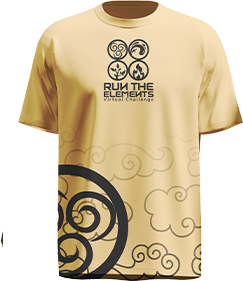
Air Shirt

Air Quarter Shirt

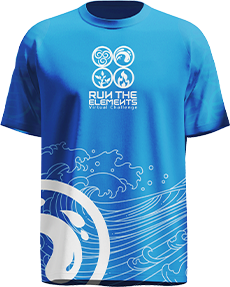
Water Shirt

Water Quarter Shirt

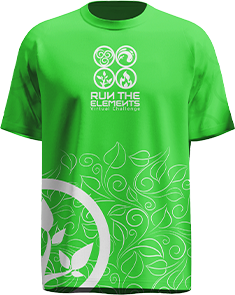
Earth Shirt

Earth Quarter Shirt

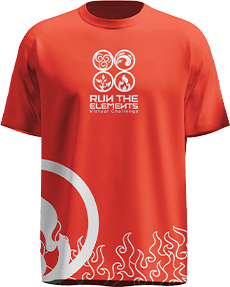
Fire Shirt

Fire Quarter Shirt

Getting Started

How It Works

1

Register

Sign up on MyRaceTime and choose your tier: Digital, Medal Pack, or Complete Pack.

2

Connect

Link Strava, Apple Health, Google Fit, Fitbit, or Samsung Health to track your activities.

3

Move

Run, walk, or cycle throughout the quarter. Every kilometre counts toward your target.

4

Upload

Upload your activities through MyRaceTime. They appear as Pending until verified by our team.

5

Collect

Medals and shirts are shipped or available at collection points after each quarter closes.

Step-by-Step

How to Upload Activities

Guides for uploading your runs, walks, and rides across every platform.

MyRaceTime Desktop

Using a laptop or desktop computer

  1. 1
    Log in to your MyRaceTime account.
  2. 2
    Navigate to and open the event you want to upload your virtual activity for.
  3. 3
    Click “CONNECT STRAVA & UPLOAD” or “CONNECT STRAVA”.
  4. 4
    Connect your Strava account to MyRaceTime.
  5. 5
    Make sure “View data about your activities” permission is enabled.
  6. 6
    Click “Authorize” to continue.
  7. 7
    Click “UPLOAD ACTIVITIES”.
  8. 8
    Select all the activities you want to upload.
  9. 9
    Click “UPLOAD SELECTED”.
  10. 10
    Uploaded activities remain in Pending status until verified by an admin.
  11. 11
    Once approved, the status changes to Verified ✓
Step 1Step 2Step 3Step 4Step 5Step 6Step 7Step 8
1 / 8

MyRaceTime Mobile Browser

Using a smartphone or tablet browser

  1. 1
    Tap the 3-line menu icon at the top right corner of the homepage.
  2. 2
    Log in to your MyRaceTime account.
  3. 3
    Navigate to Events and click “VIEW DETAILS”.
  4. 4
    Scroll down and click “CONNECT STRAVA & UPLOAD” or “CONNECT STRAVA”.
  5. 5
    Connect your Strava account to MyRaceTime.
  6. 6
    Enable “View data about your activities”.
  7. 7
    Click “Authorize”.
  8. 8
    Click “UPLOAD ACTIVITIES”.
  9. 9
    Select all the activities you want to upload.
  10. 10
    Click “UPLOAD SELECTED”.
  11. 11
    Activities remain Pending until verified by an admin.
  12. 12
    Once approved, the status changes to Verified ✓
Step 1Step 2Step 3Step 4Step 5Step 6Step 7Step 8Step 9
1 / 9

MyRaceTime Mobile App

Android & iOS

  1. 1
    Log in to the MyRaceTime app and navigate to Profile.
  2. 2
    Scroll down to “Joined Races”.
  3. 3
    Select the event you want to upload activities for.
  4. 4
    Click “Add +”.
  5. 5
    Click “Submit”.
  6. 6
    Choose Strava, Apple Health, Fitbit, Google Fit, or Samsung Health.
  7. 7
    Click “GO TO CONNECT APPS”.
  8. 8
    Connect and authorize your preferred app.
  9. 9
    For Strava, ensure “View data about your activities” is enabled.
  10. 10
    Grant all requested permissions for other integrations.
  11. 11
    Return to “Joined Races”.
  12. 12
    Click “Add +” then “Submit”.
  13. 13
    Select all activities you want to upload.
  14. 14
    Click “UPLOAD”.
  15. 15
    Activities remain Pending until verified by an admin.
  16. 16
    Once approved, the status changes to Verified ✓
⚠ Important: Only connect and upload activities from ONE connected app. Uploading duplicate activities from multiple apps may result in your account being flagged or suspended.
Step 1Step 2Step 3Step 4Step 5Step 6Step 7
1 / 7

Download the MyRaceTime App

Track your runs, log activities, and follow the leaderboard right from your phone.

GET IT ON
Google Play
DOWNLOAD ON THE
App Store
Alternative Sync Method

Sync Strava via Your Health App

Can’t connect Strava directly, or prefer not to? You can route your Strava activities through your phone’s health app — Apple Health on iPhone or Health Connect on Android — and MyRaceTime will pull them in automatically.

Connect Strava to Apple Health

  1. 1
    Open the Strava app, tap the You tab, then the gear icon (Settings).
  2. 2
    Tap “Manage Apps and Devices” (older versions: Applications, Services, and Devices).
  3. 3
    Tap Health, then the + icon, then Connect.
  4. 4
    On the Health Access screen, tap “Turn On All”. Workouts must be enabled or nothing will sync.
  5. 5
    Tap Allow in the top-right corner.
  6. 6
    Back in Strava’s Health settings, toggle “Automatic Uploads” ON so future activities sync on their own.
  7. 7
    Open MyRaceTime, go to your event, choose Apple Health under “Connect Apps”, and grant permission.
  8. 8
    Activities now flow Strava → Apple Health → MyRaceTime — no direct Strava connection needed.
Note: Activities recorded on third-party devices (Garmin, Zwift, etc.) may sync without their map/GPS route. Activities recorded with Strava or an Apple Watch carry full data.

Connect Strava to Health Connect

  1. 1
    Install the Health Connect app from the Play Store (built in on Android 14+) and sign in with your Google account.
  2. 2
    Open Strava, tap the You tab, then the gear iconManage Apps and DevicesHealth Connect.
  3. 3
    Follow the prompts to connect your Health Connect account.
  4. 4
    Open the Health Connect app → App PermissionsStrava → tap “Allow all”.
  5. 5
    Open MyRaceTime, go to your event, choose Health Connect (or Google Fit) under “Connect Apps”, and grant permission.
  6. 6
    Activities now flow Strava → Health Connect → MyRaceTime automatically.
Note: Only GPS-based activities sync through Health Connect (time, distance, calories); manually-added entries won’t carry over. If you still use Google Fit, switch to Health Connect — Google is retiring the Google Fit connection.
⚠ Important: Only sync activities from ONE source. Connecting Strava directly and through your health app can create duplicate activities, which may get your account flagged.
Powered By

Partners & Sponsors

Sponsorship Opportunities
Run The Elements
Title Sponsor
All 4 Quarters · Exclusive
The primary partner of the Run The Elements Virtual Challenge 2026. Your brand across all four quarters, all communications, and all deliverables.
Year-round brand presence

Logo on all medals, shirts, banners, email communications, and social media content for the full 2026 season.

1 slot available
Speaking & activation rights

Rights to activate at all physical collection events and participate in community engagements across all cities.
Run The Elements
Quarter Sponsor
Per Quarter
Be the face of a single quarter. Great for brands looking for a focused three-month campaign aligned with a specific element.
Air
Air — Q1 (Jan–Mar)

Full branding rights for the Air quarter. Logo on Air medals, shirts, and all Air quarter communications.

1 slot · Air Q1
Water
Water — Q2 (Apr–Jun)

Full branding rights for the Water quarter including all Water deliverables and social features.

1 slot · Water Q2
Earth
Earth — Q3 (Jul–Sep)

Full branding rights for the Earth quarter. Brand alignment with endurance and sustainability themes.

1 slot · Earth Q3
Fire
Fire — Q4 (Oct–Dec)

Full branding rights for the Fire quarter, the season finale and most high-energy quarter.

1 slot · Fire Q4

Interested in sponsoring or partnering? Click below and we will get back to you within 24 hours with the full partnership deck.

Medal & Entitlement Collection Points
🏠
Collection Point Partner
Become a designated pickup location where participants collect their medals, shirts, and all entitlements. Ideal for run clubs, gyms, sports stores, and fitness centres.
📍 Lagos

Multiple slots available across different local government areas.

Multiple slots · Lagos
📍 Abuja (FCT)

Branded presence in all Abuja distribution communications.

Multiple slots · Abuja
📍 Other Cities

Kaduna, Port Harcourt, Ibadan, Uyo, Benin, Osun, and nationwide.

Multiple slots · Nationwide
🌎 International

For participants based outside Nigeria. Serve our global community.

Multiple slots · Worldwide
What you get: Logo listed on website, feature in medal dispatch emails, branded signage template, social media feature during distribution week, and direct foot traffic from active participants in your area.
Get In Touch

Contact Us

📧
📱
Social Media
@myracetimeapp

Send a Message